Electricity Vending
Introduction
This documentation exposes the functionality of Vomule API service to third party systems interested in vending electricity via this service. The service accepts connections via HTTP on a standard SSL/TLS port, with ReSTful API. All responses are JSON formatted.
Getting Started
To start vending, now that you have an account, go to My Applications
and create an application. There can only be one application under each category. To register, click
on add new application button. Select Electricity for category. If you already have
an application under this category, you can't have another.
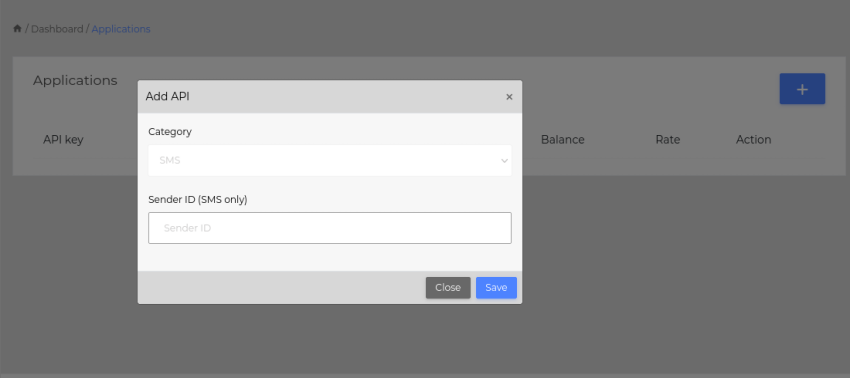 Adding an application
After a successful application creation, you will receive an email confirming the application details. The API key is very useful, and must be kept a secret as far as possible. If anyone knows your apikey, they can start selling electricity on your funds.
Vending
After a successful creation, you can start vending electricity via API or the portal. To vend via the portal, simply go to
Electricity and start vending.
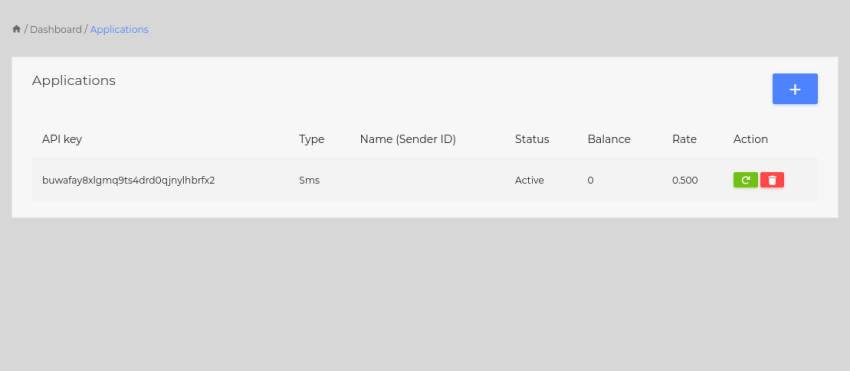 API key
API url is https://api.vomule.net. Your full url should look like https://api.vomule.net/elec/buy/APIKEY?meter=12345678&amount=50
Available functions
- check- performs a basic customer check, as means to verify the meter number.
- buy- performs electricity vending for the given meter number and amount.
- reprint- performs a reprint of the token for the given meter number.
- balance- fetches account balance.
Below is full documentation for available functions
Check
Performs a basic customer check on the given meter number, as means to verify the meter number. Though not mandatory, it is extremely important that customer check is performed before every purchase
Request Parameters
- meter- the target meter number
Response Parameters
- code - the response code; see response codes below
- owner - the full names of the owner of the given meter number
- location - the full address of the owner
- address1 - address line 1
- address2 - address line 2
- address3 - address line 3
- town - owner town
- postal - owner postal address
- maxvend - maximum allowed vend amount
- minvend - minimum allowed vend amount
Example
https://api.vomule.net/elec/check/APIKEY?meter=1234567890
Response
{
    "maxvend": "LEC LOC_4",
    "minvend": "MS HELP DANKIE",
    "datetime": "2021-10-31 20:07:30",
    "amount": null,
    "owner": "MS HELP DANKIE",
    "meternumber": "07000000773",
    "code": 200,
    "message": "Successfully completed",
    "reply": "success",
    "text": "Buy electricity for MS HELP DANKIE?"
}
Buy
Performs electricity vending for the given meter number and amount. It is crucial to call this method after having called check.
Request Parameters
- meter - the target meter number
- amount - the amount
Response Parameters
- code - the response code; see response codes below.
- owner - the owner of the given meter number
- token - the token(s) generated from the purchase
- receipt - receipt number
- transid - transaction ID
- balance - remaining balance
- commission - commission earned from this purchase
- tokens - number of tokens in the response
- units - the resulting units
- amount - purchase amount
- created_at - date of creation
Example
https://api.vomule.net/elec/buy/APIKEY?meter=1234567890&amount=50
Response
{
    "code": 200,
    "text": "Transaction completed successfully",
    "transid": "lC3erHlo8dhy79Tq",
    "meternumber": "07000000773",
    "owner": "MS HELP DANKIE",
    "token": "7416 1856 2289 3922 4021,3591 5331 5528 5256 2191,9408 9980 1969 5783 8055",
    "meter": "07000000773",
    "receipt": "37255/438",
    "balance": 998878.68,
    "commission": 2.7,
    "tokens": 3,
    "units": "6.6",
    "amount": "90.00",
    "nako": "2021-10-30T22:00:00.000000Z",
    "created_at": "2021-10-31T18:03:25.000000Z",
    "reply": "success"
}
Reprint
Performs a reprint of the token for the given meter number. This fetches the last xxx purchase records of the specified meter number. You can specify the number of records to fetch. 1 record defaults if count is not specified
Request Parameters
- meter - the target meter number
Response Parameters
- code - the response code; see response codes below.
- data - the list of purchase records of the specified meter number. The parameters inside each record are similar to those of buy function
Example
https://api.vomule.net/elec/reprint/APIKEY?meter=1234567890
Fetch 5 records
https://api.vomule.net/elec/reprint/5/APIKEY?meter=1234567890
Response
{
    "data": [
        {
            "transid": "lC3erHlo8dhy79Tq",
            "meter": "07000000773",
            "owner": "MS HELP DANKIE",
            "amount": "90.00",
            "tokens": 3,
            "token": "7416 1856 2289 3922 4021,3591 5331 5528 5256 2191,9408 9980 1969 5783 8055",
            "units": "6.60",
            "receipt": "37255/438",
            "balance": "998878.68",
            "commission": "2.70",
            "nako": "2021-10-30T22:00:00.000000Z",
            "created_at": "2021-10-31T18:03:25.000000Z"
        },
        {
            "transid": "XGIx43pmCxJAxVLo",
            "meter": "07000000773",
            "owner": "MS HELP DANKIE",
            "amount": "5.00",
            "tokens": 3,
            "token": "7416 1856 2289 3922 4021,3591 5331 5528 5256 2191,9408 9980 1969 5783 8055",
            "units": "6.60",
            "receipt": "37255/438",
            "balance": "998965.98",
            "commission": "0.15",
            "nako": "2021-10-27T22:00:00.000000Z",
            "created_at": "2021-10-28T15:25:54.000000Z"
        }
    ],
    "code": 200,
    "text": "Successfully completed",
    "reply": "success"
}
Balance
Fetches the account balance. For any application, two consecutive balance requests may yield different values. This is because the balance fetched is the amount at that specific time, and my be altered by a different request after this one.
Request Parameters
No parameters expected
Response Parameters
- code - the response code; see response codes below.
- balance - the the remaining account balance at the time of this request
Example
https://api.vomule.net/elec/balance/APIKEY
Response
{
    "code": 200,
    "balance": "998,878.68"
}
Test Scenarios
Your API has to implement the following test scenarios in order to be content that it is complete. The responses used in the test scenarios will be what you can expect in production. Please carefully ensure that you implement these test scenarios using the test API specified in Appendices
Note that purchases performed on electricity are non-refundable, NOT only test purchases, but all purchases.
Demo account login details
demo@vomule.net
demo12345
Implement the scenarios below, to handle all different kinds of responses. All these scenarios are implemented to always produce the expected results. As a result, subsequent transactions on any test case may produce the same result for all requests. All tokens are separated into groups of 4 digits
Scenarios
| Meter # | Result | Comments |
|---|---|---|
| 07000000021 | Will produce vend | Will produce vend |
| 07000000286 | Will produce vend including FBE due | Will produce vend including FBE due |
| 07000000674 | Will produce vend plus Key Change Tokens x 2 i.e. Total of 3 Tokens | 3 tokens separated with commas. Two tokens are activation tokens, and the other is the units token |
| 07000000773 | Will produce vend plus Key Change Tokens x 2 i.e. Total of 3 Tokens | 3 tokens separated with commas. Two tokens are activation tokens, and the other is the units token |
| 07000000849 | Will produce vend including FBE due, plus Arrears deduction | Will produce vend including FBE due, plus Arrears deduction |
| 07000000070 | Block meter | Will fail with message: Meter blocked |
| 07104785303 | Location without meter | Will fail with message: Location without meter |
| 07000000088 | Location without consumer | Will fail with message: Location without consumer |
Parameter Types
This section explains the parameters in details, and specifies their types. These apply to all request and response parameters
| Parameter | Type | Comments |
|---|---|---|
| address1 | string | Owner address line 1 |
| address2 | string | Owner address line 2 |
| address3 | string | Owner address line 3 |
| amount | number | Purchase amount; must be a valid currency value. Only . is allowed, otherwise, only numbers. Minimum amount is found in minvend parameter, as does maximum amount. |
| balance | number | Balance remaining after a particular purchase, or at the time it is queried |
| code | number | Response code, see below |
| commission | number | Commission earned on this purchase. Commissions are added back to your account for every purchase |
| created_at | datetime | The datetime string representing UTC time when this purchase was recorded. Datetime uses ISO datetime format (yyyy-MM-dd hh:mm:ss) |
| data | list | A list of records, each containing any of the parameters laid out in this table. This is mostly used for reprints |
| location | string | The owner's location |
| maxvend | number | Maximum vend amount |
| minvend | number | Minimum vend amount |
| meter | number | The meter number to purchase for |
| owner | string | The owner of the meter number |
| postal | string | The postal address of the owner |
| receipt | number | Receipt number for this purchase |
| town | string | The owner's town |
| token | string | Token generated for this purchase. If there are multiple tokens, they're separated with commas. Each token is separated into groups of 4 digits |
| tokens | number | Number of tokens in the response |
| transid | string | The transaction id. This may be used as reference to reprint tokens, query data, etc in the future |
| units | number | Units obtained for this purchase in kwH |
Response Codes
This section covers in details the response codes to expect when using this service.
| Code | Code name | Meaning |
|---|---|---|
| 200 | SUCCESS | Action performed successfully |
| 500 | General errors, most of which are undocumented and/or dynamic | |
| 501 | ERR_INSUFFICIENT_FUNDS | You do not have enough funds to perform this action |
| 502 | API_PENDING | Application is still pending |
| 503 | API_SUSPENDED | Application has been suspended |
| 504 | API_INVALID | API key cannot be found |
| 505 | API_NOT_APPLICABLE | Attempting to use an application which is NOT applicable to the service, such as trying to send SMS with electricity API |
Appendices
This section lays out some important points to take care of when using this API
- Test API key:
i2dffcdlwvoiceyyoewnp7nqrr2ltbxs
Use this API key to perform tests on your application. This will NOT charge your account. All your APIs are production APIs. Whenever you use them, you will be charged. Test API key works only with test meter numbers layed out in test scenarios section. - Vomule will NOT take responsibility over funds lost on test meter numbers, or any cause whatsoever.
- You accumulate commission from inside the system as you sell. You do NOT get the commission in cash.
- Actions performed on your applications that affect the balance are irreversible.
- The protection of your API your responsibility. Vomule has already done much to help you protect it. Vomule will not take responsibility over use of your API by any entity other than yourself.
- Do not share your API keys with anyone. With them they can do everything you can do
- If you think that your API key might have been leaked, you can easily change it from your applications
- Changing the API key will revoked all other registered devices from accessing the application
- The money you pay for the service is non-refundable
- When making a deposit, please use the first 6 digits of your API key as reference.